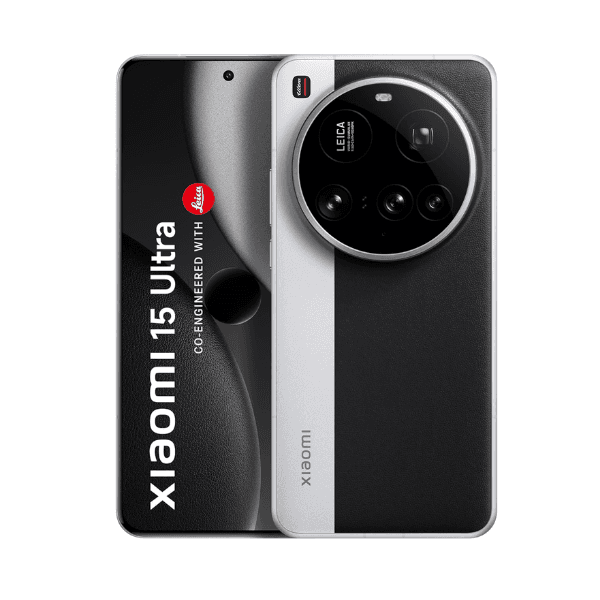
Xiaomi 15 Ultra Dual SIM Silver Chrome 16GB RAM 512GB 5G 25010PN30G - Global Version

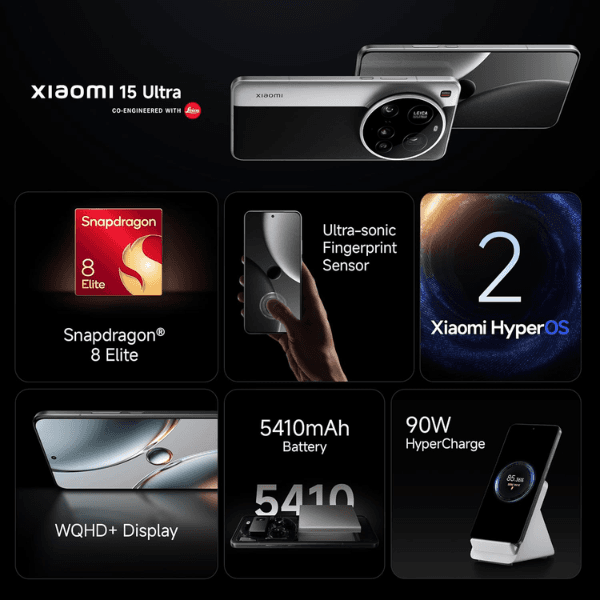
<p class="" data-start="0" data-end="15"><strong data-start="0" data-end="15">Highlights:</strong></p> <ul data-start="16" data-end="538"> <li class="" data-start="16" data-end="85"> <p class="" data-start="18" data-end="85"><strong data-start="18" data-end="30">16GB RAM</strong>: Ensures smooth multitasking and seamless performance.</p> </li> <li class="" data-start="86" data-end="163"> <p class="" data-start="88" data-end="163"><strong data-start="88" data-end="105">512GB Storage</strong>: Provides ample space for apps, photos, videos, and more.</p> </li> <li class="" data-start="164" data-end="259"> <p class="" data-start="166" data-end="259"><strong data-start="166" data-end="185">5G Connectivity</strong>: Supports ultra-fast internet speeds for streaming, gaming, and browsing.</p> </li> <li class="" data-start="260" data-end="358"> <p class="" data-start="262" data-end="358"><strong data-start="262" data-end="285">Dual SIM Capability</strong>: Allows for two SIM cards, ideal for separating work and personal lines.</p> </li> <li class="" data-start="359" data-end="419"> <p class="" data-start="361" data-end="419"><strong data-start="361" data-end="385">Silver Chrome Finish</strong>: Offers a sleek and premium look.</p> </li> <li class="" data-start="420" data-end="538"> <p class="" data-start="422" data-end="538"><strong data-start="422" data-end="440">Global Version</strong>: Compatible with international networks and services.</p> </li> </ul> <p class="" data-start="540" data-end="1211"><strong data-start="540" data-end="553">Overview:</strong> The Xiaomi 15 Ultra Dual SIM in Silver Chrome is a flagship smartphone that combines top-tier performance with a stunning design. Powered by the Qualcomm Snapdragon 8 Elite processor and equipped with 16GB of RAM, it delivers exceptional speed and efficiency. The 512GB storage capacity ensures you have plenty of room for all your data. Its 5G connectivity guarantees fast internet speeds, while the dual SIM functionality offers flexibility for users who manage multiple lines. The Silver Chrome finish adds a touch of elegance, and being the global version, it's compatible with various international networks.</p> <p class="" data-start="1213" data-end="1228"><strong data-start="1213" data-end="1228">How to Use:</strong></p> <ul data-start="1229" data-end="1561"> <li class="" data-start="1229" data-end="1282"> <p class="" data-start="1231" data-end="1282"><strong data-start="1231" data-end="1243">Power On</strong>: <span class="relative -mx-px my-[-0.2rem] rounded px-px py-[0.2rem] transition-colors duration-100 ease-in-out">Press and hold the power button until the Xiaomi logo appears.</span></p> </li> <li class="" data-start="1283" data-end="1334"> <p class="" data-start="1285" data-end="1334"><strong data-start="1285" data-end="1295">Set Up</strong>: <span class="relative -mx-px my-[-0.2rem] rounded px-px py-[0.2rem] transition-colors duration-100 ease-in-out">Follow the on-screen instructions to select your language, connect to Wi-Fi, and sign in to your Xiaomi account.</span></p> </li> <li class="" data-start="1335" data-end="1396"> <p class="" data-start="1337" data-end="1396"><strong data-start="1337" data-end="1357">Insert SIM Cards</strong>: <span class="relative -mx-px my-[-0.2rem] rounded px-px py-[0.2rem] transition-colors duration-100 ease-in-out">Use the provided SIM ejector tool to open the SIM tray and insert your nano-SIM cards.</span></p> </li> <li class="" data-start="1397" data-end="1453"> <p class="" data-start="1399" data-end="1453"><strong data-start="1399" data-end="1414">Access Apps</strong>: <span class="relative -mx-px my-[-0.2rem] rounded px-px py-[0.2rem] transition-colors duration-100 ease-in-out">Swipe up from the home screen to view and open your apps.</span></p> </li> <li class="" data-start="1454" data-end="1561"> <p class="" data-start="1456" data-end="1561"><strong data-start="1456" data-end="1478">Customize Settings</strong>: <span class="relative -mx-px my-[-0.2rem] rounded px-px py-[0.2rem] transition-colors duration-100 ease-in-out">Navigate to the Settings app to adjust preferences such as display, notifications, and privacy.</span></p> </li> </ul> <p class="" data-start="1563" data-end="1644"><span class="relative -mx-px my-[-0.2rem] rounded px-px py-[0.2rem] transition-colors duration-100 ease-in-out">For more detailed specifications and features, you can refer to the official Xiaomi website or trusted tech review sites.</span></p>